Custom grub Theme
A quick guide for making ANSI grub theme
· 3 min read
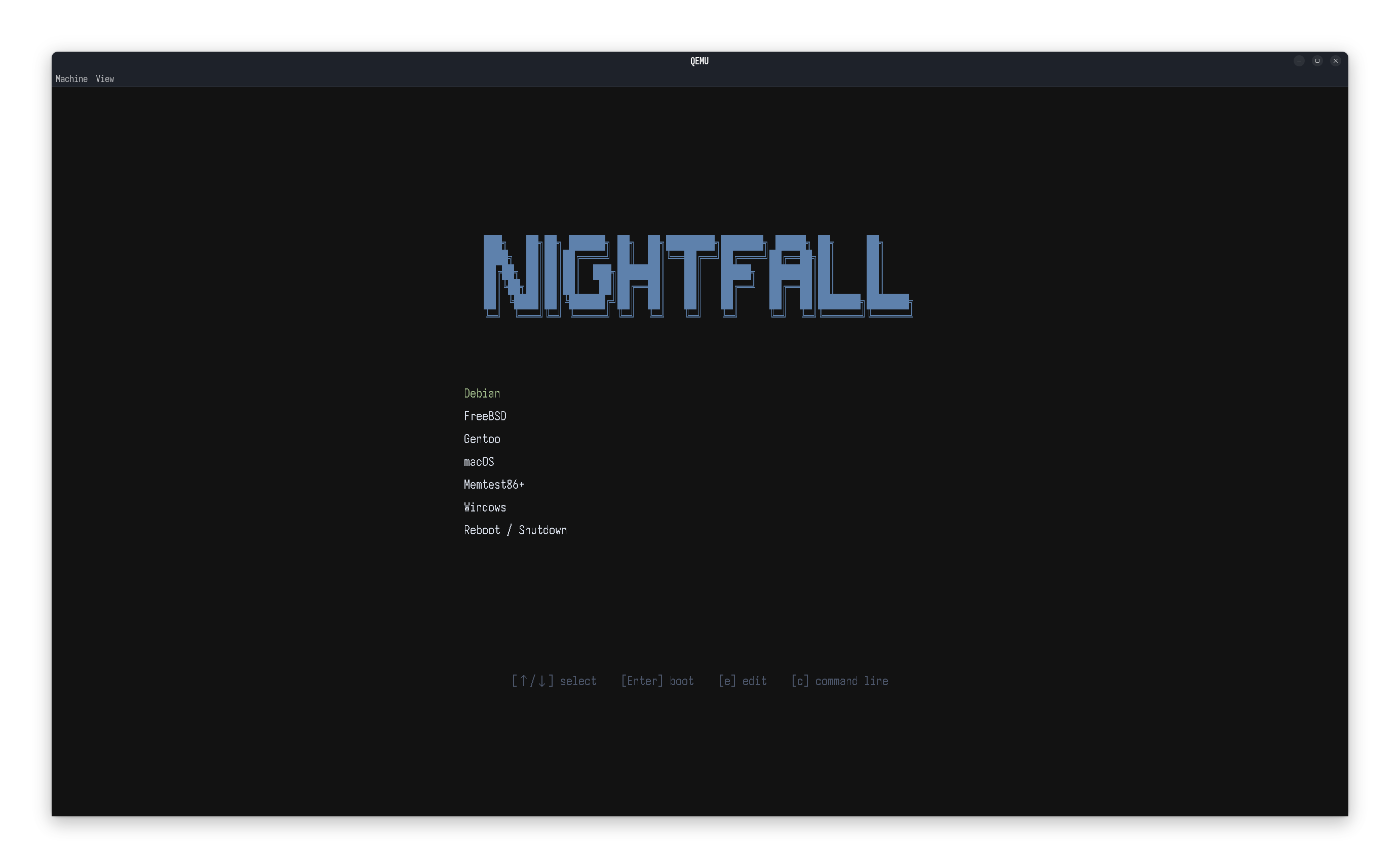
We list the simple steps to take in making a custom grub theme populated with ANSI arts. At the end, we create a custom grub theme as below:
Tools #
grub: obviously.grub2-theme-preview: preview themes.- ANSI Art Generator: https://patorjk.com/software/taag/
- Fonts: some
.ttffonts of your choice
Fonts #
For grub, we first convert any .ttf fonts to .pf2.
grub-mkfont -s 14 -o ~/Iosevka-Nerd-Font-Propo-14.pf2 /usr/share/fonts/TTF/IosevkaNerdFontPropo-Regular.ttfWe therefore convert the .ttf font at /usr/share/fonts/TTF/IosevkaNerdFontPropo-Regular.ttf into a .pf2 file under ~/Iosevka-Nerd-Font-Propo-14.pf2 at font size 14. The internal name for this font should be Iosevka Nerd Font Propo 14. We repeat this process to build any combination of fonts needed.
ANSI Art #
We generate the ANSI arts with the generator. An example text output shows:
███╗   ██╗██╗ ██████╗ ██╗  ██╗████████╗███████╗ █████╗ ██╗     ██╗
████╗  ██║██║██╔════╝ ██║  ██║╚══██╔══╝██╔════╝██╔══██╗██║     ██║
██╔██╗ ██║██║██║  ███╗███████║   ██║   █████╗  ███████║██║     ██║
██║╚██╗██║██║██║   ██║██╔══██║   ██║   ██╔══╝  ██╔══██║██║     ██║
██║ ╚████║██║╚██████╔╝██║  ██║   ██║   ██║     ██║  ██║███████╗███████╗
╚═╝ ╚═══╝╚═╝ ╚═════╝ ╚═╝ ╚═╝ ╚═╝ ╚═╝ ╚═╝ ╚═╝╚══════╝╚══════╝In the actual grub theme file, this is best loaded as a series of labels with hardcoded alignment.
Theme Template #
We now build a theme.txt file to specify the grub theme. An example theme at /boot/grub/themes/lazygrub is shown below:
# GRUB2 Theme: Text-Based Nord Dark/Midnight themes
# ---------------------------------------------------------

# Global properties
title-text: ""
desktop-color: "#121212" # nn 0

# ---------------------------------------------------------
# ASCII Art Header
# ---------------------------------------------------------
+ label {
    top = 20%
    left = 30%
    width = 40%
    text = "███╗   ██╗██╗ ██████╗ ██╗  ██╗████████╗███████╗ █████╗ ██╗     ██╗     "
    font = "Iosevka Nerd Font Propo 24"
    color = "#5e81ac" # nord 10
    align = "center"
}
+ label {
    top = 22%
    left = 30%
    width = 40%
    text = "████╗  ██║██║██╔════╝ ██║  ██║╚══██╔══╝██╔════╝██╔══██╗██║     ██║     "
    font = "Iosevka Nerd Font Propo 24"
    color = "#5e81ac"
    align = "center"
}
+ label {
    top = 24%
    left = 30%
    width = 40%
    text = "██╔██╗ ██║██║██║  ███╗███████║   ██║   █████╗  ███████║██║     ██║     "
    font = "Iosevka Nerd Font Propo 24"
    color = "#5e81ac"
    align = "center"
}
+ label {
    top = 26%
    left = 30%
    width = 40%
    text = "██║╚██╗██║██║██║   ██║██╔══██║   ██║   ██╔══╝  ██╔══██║██║     ██║     "
    font = "Iosevka Nerd Font Propo 24"
    color = "#5e81ac"
    align = "center"
}
+ label {
    top = 28%
    left = 30%
    width = 40%
    text = "██║ ╚████║██║╚██████╔╝██║  ██║   ██║   ██║     ██║  ██║███████╗███████╗"
    font = "Iosevka Nerd Font Propo 24"
    color = "#5e81ac"
    align = "center"
}
+ label {
    top = 30%
    left = 30%
    width = 40%
    text = "╚═╝  ╚═══╝╚═╝ ╚═════╝ ╚═╝  ╚═╝   ╚═╝   ╚═╝     ╚═╝  ╚═╝╚══════╝╚══════╝"
    font = "Iosevka Nerd Font Propo 24"
    color = "#5e81ac"
    align = "center"
}

# ---------------------------------------------------------
# Boot Menu Container
# ---------------------------------------------------------
+ boot_menu {
    left = 30%
    top = 40%
    width = 40%
    height = 30%
    item_font = "Iosevka Nerd Font Propo 20"
    item_color = "#D8DEE9"
    item_height = 40
    item_padding = 10
    item_spacing = 5
    item_align = "center"

    selected_item_color = "#A3BE8C"
    selected_item_bg_color = "#3B4252"

    menu_pixmap_style = "none"
    scrollbar = "false"
}

# ---------------------------------------------------------
# Bottom Information Label
# ---------------------------------------------------------
+ label {
    id = "__info_label__"
    text = "[↑/↓] select    [Enter] boot    [e] edit    [c] command line"
    font = "Iosevka Nerd Font Propo 14"
    color = "#4c566a" # nord3
    align = "center"
    left = 10%
    top = 80%
    width = 80%
}Theme Preview #
We preview this theme with grub2-theme-preview at 1440p resolution:
grub2-theme-preview --resolution 2560x1440 /boot/grub/themes/lazygrub/Apply Changes #
We now add the following line to grub. Let us simply edit it with nvim:
sudo nvim /etc/default/grubWe find GRUB_THEME= and update the values. For example:
GRUB_THEME='/boot/grub/themes/lazygrub/theme.txt'Lastly, we apply the changes to grub. For example:
sudo grub-mkconfig -o /boot/grub/grub.cfgEnjoy the new theme!